
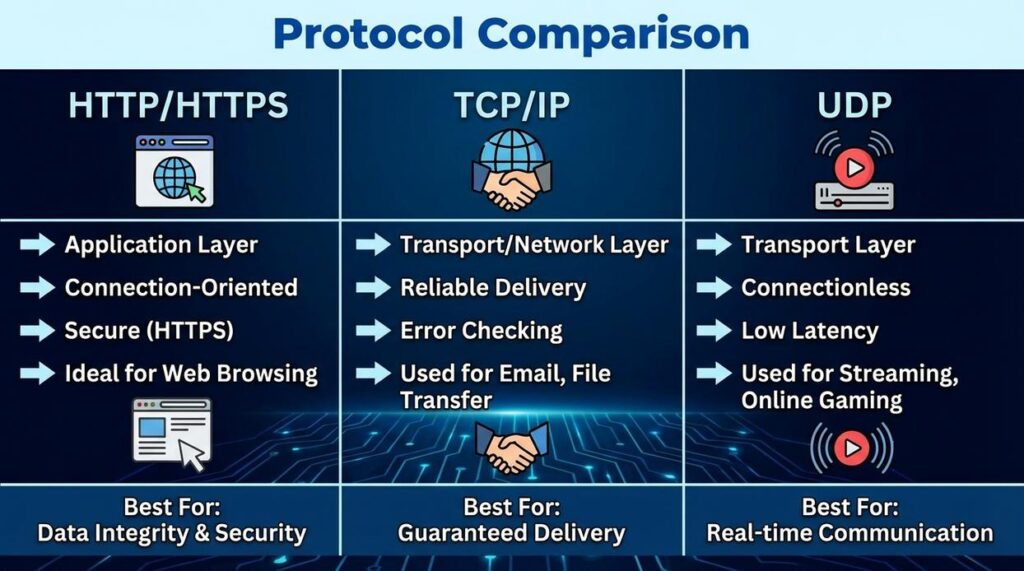
If you’re searching for clear, up‑to‑date guidance on how ftp and smtp fit into modern digital infrastructure, you’re likely trying to solve a practical problem—configuring servers, securing data transfers, or understanding how legacy protocols still power critical systems today. The challenge is that most resources either oversimplify these protocols or bury you in outdated technical jargon.
This article cuts through that noise. We break down how ftp and smtp actually function in current environments, where they’re still relevant, how they interact with modern hardware and cloud setups, and what security considerations you can’t afford to ignore. Whether you’re managing a private server, maintaining archived systems, or optimizing a new deployment, you’ll find clear, actionable explanations here.
Our insights are grounded in hands-on testing, infrastructure monitoring, and analysis of real-world deployment scenarios—so you’re not just getting theory, but practical knowledge you can apply immediately.
Every time you open a browser, you’re relying on invisible rules called protocols. Think of them as the grammar of the internet; without them, devices couldn’t communicate. However, two foundational protocols—FTP and SMTP—often get blurred together. While both move data, their purposes differ significantly.
To clarify, consider this breakdown:
- FTP transfers files between clients and servers, enabling website uploads and backups.
- SMTP routes outgoing email across mail servers, ensuring messages reach inboxes.
In other words, ftp and smtp relevance lies in specialization. Together, they form distinct, interoperable pillars of the TCP/IP suite, strengthening reliable, structured digital communication worldwide.
A Deep Dive into FTP: The Workhorse of File Transfer
File Transfer Protocol (FTP) is a client-server protocol built specifically for moving large batches of files across a network. In plain terms, it’s the digital equivalent of a freight truck—less glamorous than modern cloud sync tools, but incredibly reliable when you need serious cargo moved.
The Dual-Channel Architecture
One thing that confuses (and frustrates) newcomers is FTP’s two-connection model. It uses Port 21 for the control connection—where commands like login and directory changes happen—and Port 20 for the data connection, where the actual files move. This separation boosts efficiency for large transfers, even if configuring firewalls can feel like solving a puzzle at 2 a.m. (We’ve all been there.)
| Connection Type | Port | Purpose |
|—————–|——|———-|
| Control | 21 | Sends commands |
| Data | 20 | Transfers files |
FTP is also stateful, meaning the server remembers your session details—like your current directory—until you disconnect. That’s convenient compared to stateless protocols, though critics argue newer tools are simpler. Fair point. Still, for uploading websites, sharing research datasets, or pulling archived files from remote systems, FTP remains dependable.
Understanding ftp and smtp relevance helps clarify why FTP dominates file movement while SMTP handles email delivery—different tools, different jobs.
Deconstructing SMTP: The Engine of Email Delivery
Simple Mail Transfer Protocol (SMTP) is the standard protocol responsible for sending email from a mail client to a mail server—and relaying it between servers until it reaches its destination. If email were a postal system, SMTP would be the courier truck moving envelopes from one sorting center to another.
SMTP operates as a “push” protocol, meaning it actively pushes messages outward. This differs from POP3 or IMAP, which pull messages down to your inbox when you check mail. Think of SMTP as the sender and IMAP as the receiver (like streaming vs. downloading episodes of your favorite show).
Technically, SMTP uses a single connection model, typically over Port 25, where commands and message data move sequentially across one continuous session (RFC 5321). That simplicity is part of its longevity.
Originally, SMTP handled only 7-bit ASCII text. As email evolved beyond plain text, MIME (Multipurpose Internet Mail Extensions) enabled attachments, images, and multimedia content (RFC 2045).
If you’re configuring infrastructure, use authenticated SMTP on secure ports (587 or 465) instead of default Port 25. Pro tip: always enable TLS encryption to prevent interception.
Understanding ftp and smtp relevance clarifies why different protocols serve distinct transfer roles.
For deeper protocol context, read a deep dive into the history of tcp ip protocols.
FTP vs. SMTP: A Direct Architectural Comparison
At a glance, FTP and SMTP might seem like relics of an earlier internet era. However, their architectural decisions still shape modern infrastructure.
Purpose and Function
FTP (File Transfer Protocol) is designed for file access and management. It allows users to upload, download, rename, and organize files on remote servers. By contrast, SMTP (Simple Mail Transfer Protocol) is built strictly for message delivery and relay between mail servers. In other words, FTP manages storage interactions, while SMTP moves communications from point A to point B.
Connection Handling
Here’s where the divergence becomes architectural. FTP uses out-of-band control, meaning two channels: one for commands and another for data transfer. This separation can improve transfer efficiency but complicates firewall configuration. SMTP, on the other hand, uses in-band control, operating over a single channel. As a result, it’s simpler to route but less flexible for parallel data handling.
Data Type Specialization
FTP natively transfers binary and text files without modification. SMTP, however, was built for text. To send attachments, it relies on MIME (Multipurpose Internet Mail Extensions), which encodes non-text data into text-friendly formats.
Command and Response
FTP includes filesystem commands like ls, cd, and get. SMTP focuses on transaction commands such as MAIL FROM, RCPT TO, and DATA.
Security Considerations
Originally, both sent data in plaintext. FTP exposed credentials; SMTP risked message interception. Today, FTPS and SMTPS encrypt sessions, addressing these weaknesses. Understanding ftp and smtp relevance today means recognizing how these foundational trade-offs still influence secure system design globally.
Why Are They Separate? The Logic of Protocol Specialization
Years ago, while configuring a home lab, I tried using ftp to move quick configuration notes between machines. It felt like hiring a moving truck to deliver a postcard (technically possible, wildly inefficient). That’s when the “Right Tool for the Job” principle clicked. A protocol—a defined set of rules for how computers communicate—should match its task. File Transfer Protocol handles large, continuous data streams. Simple Mail Transfer Protocol, or smtp, moves short, bursty text messages. Mixing those roles would add needless complexity.
FTP’s dual-channel design (one channel for commands, one for data) keeps big transfers flowing without interrupting instructions. Email doesn’t need that overhead; a single channel is lean and sufficient.
Historically, these systems solved two separate problems:
- Remote file storage and retrieval
- Electronic messaging across networks
Some argue one universal protocol would simplify everything. In practice, specialization improves efficiency, reliability, and performance (and saves plenty of headaches).
Navigating Digital Infrastructure with the Right Protocol
FTP and SMTP are not interchangeable—full stop. One acts like a digital library for storing and retrieving files; the other works as a post office for sending messages. Confusing them is like trying to ship a package through a bookshelf (it won’t end well).
Their relationship is simple:
- Parallel roles within the application layer
- Separate, critical responsibilities
- Zero functional overlap
Understanding ftp and smtp relevance is foundational. In my view, anyone serious about web development or network administration should treat this distinction as basic literacy—not optional trivia.
Build a Faster, Smarter File Transfer Workflow
You came here to understand how legacy transfer protocols still impact modern systems — and now you can clearly see where ftp and smtp fit into today’s digital infrastructure.
The challenge isn’t just knowing what these protocols do. It’s knowing when to use them, how to secure them, and how to integrate them into evolving hardware and network environments without creating vulnerabilities or inefficiencies.
If slow transfers, unreliable message routing, or outdated configurations have been holding your systems back, the solution is simple: modernize your setup with the right protocol strategy and infrastructure insight.
Start by auditing your current file transfer and mail routing configurations. Identify gaps. Upgrade security layers. Optimize performance. Then stay ahead of emerging hardware trends and archived protocol updates so your systems never fall behind again.
We’re trusted by tech-forward professionals who rely on accurate infrastructure insights and proven setup guidance to eliminate bottlenecks and future-proof their environments.
Don’t let outdated configurations limit your performance. Explore the latest protocol strategies and upgrade your workflow today.
 Geoffrey Southernovalen is the kind of writer who genuinely cannot publish something without checking it twice. Maybe three times. They came to tech setup tutorials through years of hands-on work rather than theory, which means the things they writes about — Tech Setup Tutorials, Innovation Alerts, Digital Infrastructure Insights, among other areas — are things they has actually tested, questioned, and revised opinions on more than once.
That shows in the work. Geoffrey's pieces tend to go a level deeper than most. Not in a way that becomes unreadable, but in a way that makes you realize you'd been missing something important. They has a habit of finding the detail that everybody else glosses over and making it the center of the story — which sounds simple, but takes a rare combination of curiosity and patience to pull off consistently. The writing never feels rushed. It feels like someone who sat with the subject long enough to actually understand it.
Outside of specific topics, what Geoffrey cares about most is whether the reader walks away with something useful. Not impressed. Not entertained. Useful. That's a harder bar to clear than it sounds, and they clears it more often than not — which is why readers tend to remember Geoffrey's articles long after they've forgotten the headline.
Geoffrey Southernovalen is the kind of writer who genuinely cannot publish something without checking it twice. Maybe three times. They came to tech setup tutorials through years of hands-on work rather than theory, which means the things they writes about — Tech Setup Tutorials, Innovation Alerts, Digital Infrastructure Insights, among other areas — are things they has actually tested, questioned, and revised opinions on more than once.
That shows in the work. Geoffrey's pieces tend to go a level deeper than most. Not in a way that becomes unreadable, but in a way that makes you realize you'd been missing something important. They has a habit of finding the detail that everybody else glosses over and making it the center of the story — which sounds simple, but takes a rare combination of curiosity and patience to pull off consistently. The writing never feels rushed. It feels like someone who sat with the subject long enough to actually understand it.
Outside of specific topics, what Geoffrey cares about most is whether the reader walks away with something useful. Not impressed. Not entertained. Useful. That's a harder bar to clear than it sounds, and they clears it more often than not — which is why readers tend to remember Geoffrey's articles long after they've forgotten the headline.